Remove and Replace the SCB
The System Control Blade (SCB) is the main controller for all library operations. It contains the user interface operations, Web Services, and it stores the configuration.
The SCB is located in the Control Service Module (CSM).
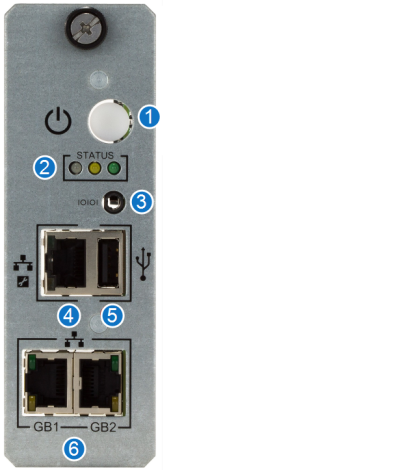
| Item | Name | Description |
|---|---|---|
|
1 |
Power Switch | The power switch initiates the shutdown procedure when you press it for two seconds. If you press it for five seconds, you will force a hard shutdown. It is solid green and illuminated when the library is powered on. |
| 2 | Status LEDs |
Normal indications:
|
| 3 | Serial Port | The serial port is for engineering use only. |
| 4 | Service Port | The service port allows you to connect directly to the library to perform service functions. |
| 5 | Service USB | The service USB port is not used at this time. |
| 6 | Ethernet Ports |
The Ethernet ports allow you to connect the library to a network. This allows you to connect to hosts and to configure and operate the library through the WebGUI. While the ports are identical in function, use Gb1 as your primary network connection and Gb2 as your secondary connection. There are two for redundancy. GB1 and GB2 correspond to the interface settings in the i6 Network Settings menu. |
Remove the SCB
Important Information
Before you begin the SCB removal, review the following information.
-
If the existing SCB is being moved from an existing Control Service Module (CSM) to a replacement CSM, it must have a Reset to Factory Default performed on it to clear the old configuration.
 How to Reset to Factory Default
The Factory Defaults feature will revert your library back to its initial configuration. This means that any partitions created, or users setup or slot allocation as well as many other features will be lost.
The only library configuration data that will be retained is IP address settings. You should only use this feature when approved of, or requested by, Quantum Service. Before resetting the library to its factory defaults, always save your configuration for possible restoration.
- From the WebGUI Navigation panel, select Service.
- In the Operations panel, click Factory Defaults.
- If you save the library configuration before removing the SCB, you can only restore it on an SCB that is going into the exact same CSM. If you replace the CM and perform a Reset to Factor Default, you cannot restore the library configuration.
- Quantum recommends saving the library configuration any time a change in configuration occurs.
Step 1 - Save the Library Configuration
Your library has many configurable items, such as tape drive IDs, partitions, user accounts, Import/Export (I/E) slots, and cleaning slots. The Save/Restore window (System > Actions > Save/Restore in the WebGUI) allows you to save your library's configuration and then restore the library’s firmware and configurable items to a previous state in the event of a hardware failure or firmware upgrade.
| Item | Description | Action |
|---|---|---|
| Save Configuration | Saves the current library configuration. | Select the radio button. Click Apply. The library configuration file is downloaded. You can then use the file locally or email it. |
Click Close to exit the window.
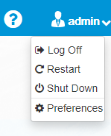
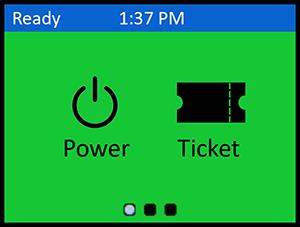 Step 3 - Label and Disconnect Cables
- Ethernet cables should be clearly labeled so they can be reconnected to the correct ports once the replacement SCB is installed.
- Once the cables have been labeled, disconnect them from the SCB.
Step 4 - Remove the SCB
-
Loosen the SCB thumbscrew.
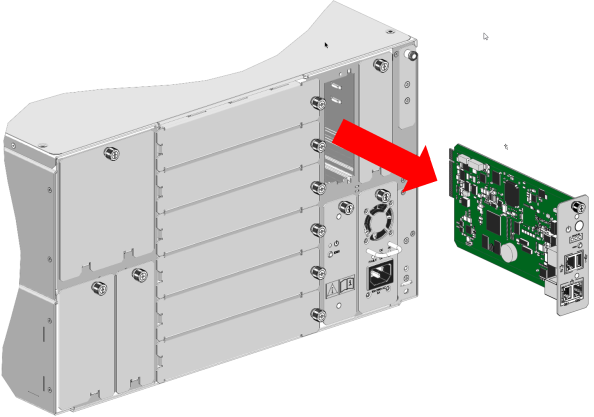
- Use the thumbscrew to slide the SCB out of the module.
Replace the SCB
Step 1 - Install the SCB
-
Gently slide the SCB into it's slot in the library until you feel the electrical connection slide in to place.
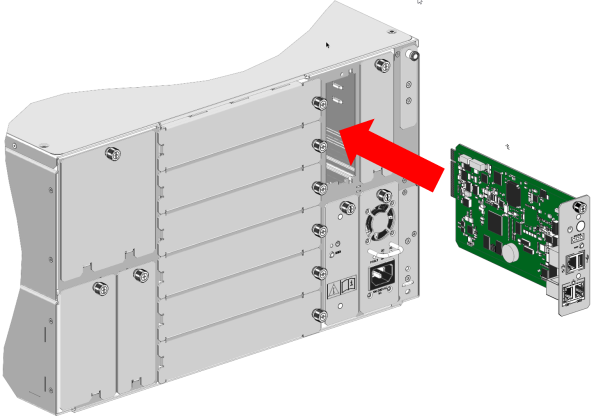
- Tighten the SCB thumbscrew until finger tight.
- Plug the power cords back into the power supplies. The library will begin start up operations.
Step 2 - Reconnect to the Library
Reconnect the Ethernet cables to the new SCB.
Before you can restore the library configuration, you need access to the library.
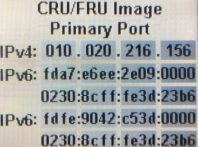
If the library is on a network for with DHCP server, the library's LUI will display the new IP address of the system. Record the IP from the LUI and use it to log in again. Do not include any leading zeros displayed in the LUI when entering the address in a browser. For example, if the LUI presents you with the screen shown below, you enter the address 10.20.216.156 in your browser.
If the network does not have a DHCP server, the LUI will display the IP table in the LUI with no IP values entered in the cells. Connect to the library using the service port (see Connect to the Service Port).
Step 2 - Restore the Library Configuration
- In the WebGUI, select System from the Navigation panel.
- Select Save/Restore from the Actions panel.
| Item | Description | Action |
|---|---|---|
| Restore Configuration |
Restores library to the selected configuration. After the restore, the library will automatically reboot. |
Select the radio button. |
Click Close to exit the window.
