 minute read
Remove and Replace an iSCSI Bridge
The Scalar
The iSCSI bridge available in two (2) configuration options; two (2) 10 GbE SFP+ Optical or two (2) 10 GbE RJ45 SFP Copper ports.
Tape Library and Drive Support
| iSCSI Bridge SFP+ Optical | iSCSI Bridge RJ45 Copper | |
|---|---|---|
| Input Connectors | Two (2) 10 Gb Ethernet | Two (2) 10 Gb Ethernet |
| Connector Type | SFP+ Optical | RJ45 SFP Copper |
| Number of Bridges | One (1) bridge per module, maximum of six (6) bridges per library | |
| Number of Supported Drives | Up to 4 tape drives per bridge | |
| Tape Drive Generation | LTO-6 and above (SAS only) | |
| Tape Drive Connectivity | One (1) 12Gb Mini-SAS HD SFF 8644 port on bridge; negotiates to 6Gb as needed Tape Drive Connectivity | |
| Management Connectivity | One (1) 1Gb Ethernet RJ45 port | |
| Power Supply | Requires 440W power supply to be installed. 315W power supply is not supported. | |
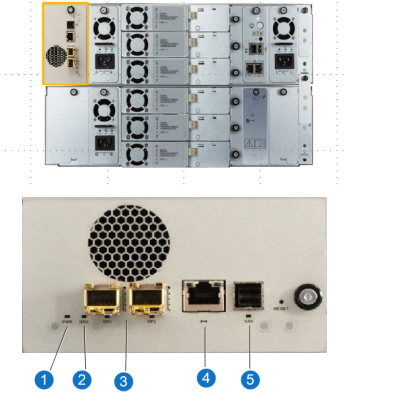
| Item | Name | Description |
|---|---|---|
|
1 |
Power Supply |
LED indicates the following:
|
| 2 | Ready Alert |
Status of iSCSI bridge. LED indicates the following:
|
| 3 | Ethernet Ports |
Connects to Ethernet networks. Two different options:
LEDs indicate the following:
|
| 4 | Ethernet Management Port |
One 1GbE RJ45 port. LEDs indicate the following:
|
| 5 | SAS Port |
Provides tape drive connectivity. 12Gb Mini-SAS HD SFF 8644 port on bridge; negotiates to 6Gb as needed. LED indicate the following:
|
iSCSI Bridge Replacement
-
Save the iSCSI Bridge Configuration.
Use the
DumpConfigurationCLI command to save a copy of the current iSCSI configuration. Refer to the Scalar iSCSI Bridge Installation and Configuration Guide. -
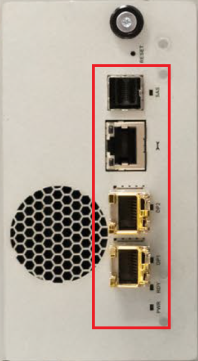
Disconnect the Ethernet cables and SAS cable from the iSCSI bridge.
-
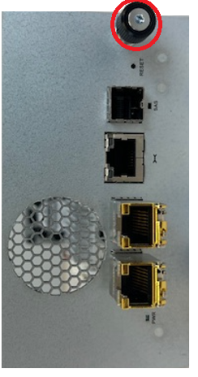
Loosen the thumbscrew and remove the iSCSI bridge from the library.
Caution: Before removing the iSCSI bridge, attach an ESD strap to your wrist and to an unpainted surface on the library.
- Slide the new iSCSI bridge in until you feel the connector slip into the library connector.
- Tighten the iSCSI thumbscrew.
-
Reconnect the cables to the iSCSI bridge exactly as they were before.
-
Restore the iSCIS bridge configuration. Refer to the Scalar iSCSI Bridge Installation and Configuration Guide.
