 minute read
DXi9200 Node Front Panel Features and Indicators
The controls, indicators, and connectors are located behind the optional rack bezel on the front panel of the DXi9200 Node.
DXi9200 Node - Front View
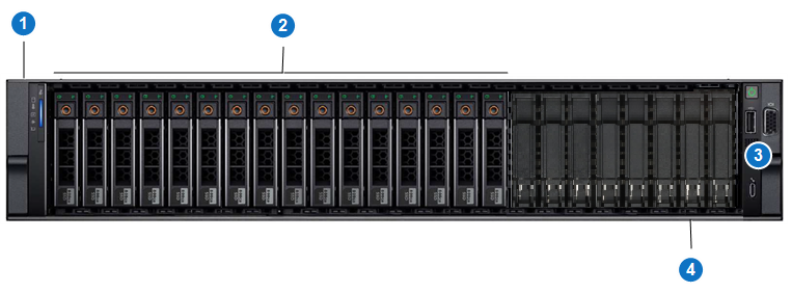
DXi9200 Node - Front Panel LED Indicators, Buttons, and Connectors
| Item | Indicator, Button, or Connector | Description |
|---|---|---|
| 1 | Left control panel |
Contains system health and system ID, and status LEDs. See DXi9200 Node - Left Control Panel for more information. Note: The diagnostic indicators display error statuses during system startup. |
| 2 | Solid state drives (SSDs) | Eight or sixteen 2.5 inch solid state drives (1.92 TB each). |
| 3 | Right control panel | Contains the power button, VGA port, iDRAC Direct micro USB port and two USB 2.0 ports. See DXi9200 Node - Right Control Panel for more information. |
| 4 | Information tag | A slide-out label panel which displays the system serial number. |
DXi9200 Node - Left Control Panel
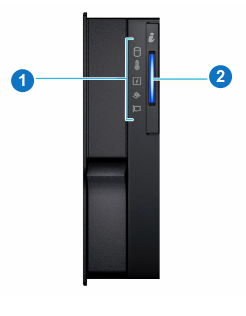
DXi9200 Node - Left Control Panel Indicators
| Item | Indicator, Button, or Connector | Description |
|---|---|---|
| 1 | Status LED Indications |
The diagnostic indicators light up to display error statuses. For a description of possible statuses, see the table below. Note: The diagnostic indicators display error statuses during system startup. |
| 2 | System Health and System ID Indication |
Indicates the system health. Solid blue - The system is on and in good health. Blinking amber - The system is on and an error exists. If an error exists, see General Troubleshooting . |
DXi9200 Node - Status LED Indicators
|
Indicator |
Icon |
Condition |
Recommended Action |
| Hard Drive |

|
Blinking amber - A hard drive error has occurred | See Hardware Problems. |
| Temperature |

|
Blinking amber - A thermal error has occurred. | See Temperature Problems. |
| Electrical |

|
Blinking amber - An electrical error has occurred. | See Hardware Problems |
| Memory |

|
Blinking amber - A memory error has occurred. | See General Troubleshooting . |
| PCIe |

|
Blinking amber - A PCIe card error has occurred. | See General Troubleshooting . |
DXi9200 Node - Right Control Panel
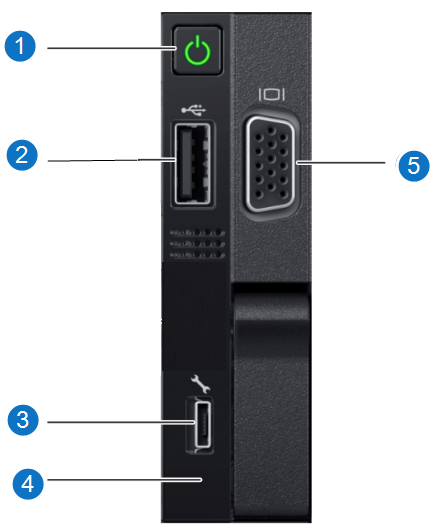
DXi9200 Node - Right Control Panel Indicators
