DXi6900 Node Rear Panel Features
Figure 1 shows the connectors located on the rear panel of the DXi6900 G1 Node. Table 1 describes each item. Table 2 describes the PCI slot configuration options.
Figure 2 shows the connectors located on the rear panel of the DXi6900 G2 and DXi6900-S Nodes. Table 3 describes each item. Table 4 describes the PCI slot configuration options.
Note: Refer to the port numbering labels on the back of the Node chassis to help you determine the correct port connections.
Caution: Do not disconnect any SAS cables from the Node during normal system operation. Unplugging a SAS cable while the system is powered on may result in data loss.
10 GbE Cable Types
Depending on the configuration, Quantum DXi6900 systems support one of the following 10 GbE cable types:
- 10 GbE optical cable lengths of up to 300 meters with OM3 cables and up to 100 meters with OM2 cables - Quantum recommends using the two 10 meter LC to LC type optical cables that are shipped with the DXi6900 system. Consult your 10 GbE optical switch/SFP documentation for additional information on optical cable requirements.
-
10 GbE Twinax cable - Quantum recommends using the approved 5 meter Twinax cable type that is shipped with the DXi6900 system. This cable is compatible with Cisco 5000 Series Data Center Class switches.
The 10 GbE Copper (Twinax) cable options that Quantum provides do not support all switches. Please note the supported switches during the purchase-configuration process, and if the Twinax cables supplied by Quantum are not compatible with your switch, then you will need to provide your own compatible Twinax cables from your switch vendor. Be sure to have these available before the system installation takes place.
Figure 1: Node Rear View - DXi6900 G1
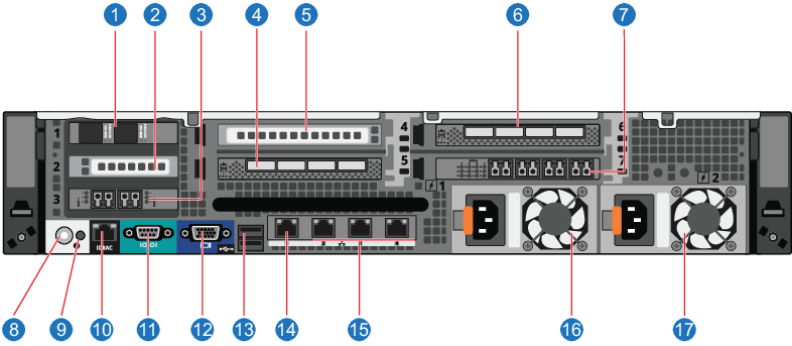
Table 1: Rear Panel Connectors - DXi6900 G1
| Item | Indicator, Button, or Connector | Description |
|---|---|---|
| 1 | 2 x 10 GbE (SFP+) Ethernet ports | For data ingest/read. |
| 2 | (Optional) 2 x 10 GbE (SFP+) Ethernet ports or 4 x 1 GbE Ethernet ports | For data ingest/read. Table 2 lists all DXi6900 G1 configuration options. |
| 3 | 2 x 8 Gb or 2 x 16 Gb Fibre Channel ports | For path to tape or VTL ingest/read. |
| 4 | 4 x 6 Gb SAS ports |
For connection to Array modules (RBOD)s. Note: The rightmost two ports are not used. |
| 5 | (Optional) 2 x 10 GBase-T Ethernet port | For data ingest/read. Table 2 lists all DXi6900 G1 configuration options. |
| 6 | 4 x 6 Gb SAS ports |
For connection to Array modules (RBOD)s. Note: The rightmost two ports are not used. |
| 7 | 4 x 8 Gb or 2 x 16 Gb Fibre Channel ports | For path to tape or VTL ingest/read. |
| 8 | System identification button | Press to toggle the system ID on and off. The identification buttons on the front and back panels can be used to locate a particular system within a rack. When one of these buttons is pressed, the LCD panel on the front and the system status indicator on the back flashes until one of the buttons is pressed again. |
| 9 | System identification connector | Not used. |
| 10 | iDRAC port | For Quantum use only. |
| 11 | Serial connector | For Quantum use only. |
| 12 | VGA connector |
Caution: Use of connected peripheral devices, such as a USB or PS/2 keyboard and mouse or a VGA display, is not supported and may cause incorrect system operation. |
| 13 | USB 2.0 connectors (2) |
Caution: Use of connected peripheral devices, such as a USB or PS/2 keyboard and mouse or a VGA display, is not supported and may cause incorrect system operation. |
| 14 | Service port ऀ | For Quantum use only. |
| 15 | 3 x 1 GbE Ethernet ports | For data ingest/read. |
| 16 | Power supply (PSU1) | 750 watt hot-swappable power supply. |
| 17 | Power supply (PSU2) | 750 watt hot-swappable power supply. |
Table 2: DXi6900 G1 PCI Slot Configuration Options
| Option | PCI Slot 2 | PCI Slot 4 |
|---|---|---|
| 101 | 2 x 10 GbE (SFP+) Ethernet ports | |
| 102 | 4 x 1 GbE Ethernet ports | |
| 103 | 2 x 10 GBase-T Ethernet port |
Figure 2: Node Rear View - DXi6900 G2 and DXi6900-S
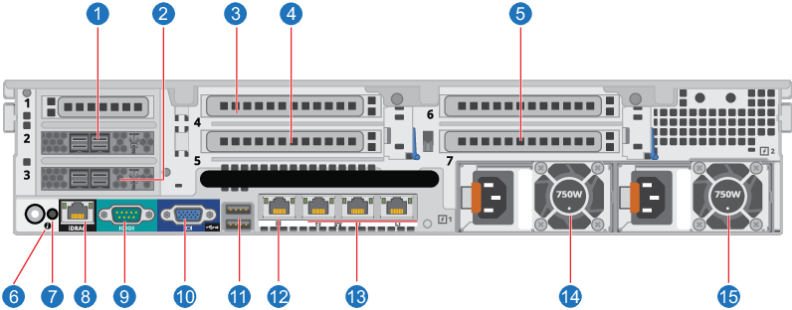
Table 3: Rear Panel Connectors - DXi6900 G2 and DXi6900-S
| Item | Indicator, Button, or Connector | Description |
|---|---|---|
| 1 | 2 x 12 Gb SAS ports | For connection to Array modules (RBOD)s. |
| 2 | 2 x 12 Gb SAS ports | For connection to Array modules (RBOD)s. |
| 3 |
(Optional) 2 x 10 GbE (SFP+) Ethernet ports 2 x 10 GBase-T Ethernet port 2 x 16 Gb Fibre Channel |
For data ingest/read (Ethernet) or path to tape/VTL ingest/read (Fibre Channel). Table 4 lists all DXi6900 G2 and DXi6900-S configuration options.
|
| 4 |
(Optional) 2 x 10 GbE (SFP+) Ethernet ports 2 x 10 GBase-T Ethernet port 2 x 16 Gb Fibre Channel |
For data ingest/read (Ethernet) or path to tape/VTL ingest/read (Fibre Channel). Table 4 lists all DXi6900 G2 and DXi6900-S configuration options. |
| 5 |
(Optional) 2 x 10 GbE (SFP+) Ethernet ports 2 x 10 GBase-T Ethernet port 2 x 16 Gb Fibre Channel |
For data ingest/read (Ethernet) or path to tape/VTL ingest/read (Fibre Channel). Table 4 lists all DXi6900 G2 and DXi6900-S configuration options. |
| 6 | System identification button | Press to toggle the system ID on and off. The identification buttons on the front and back panels can be used to locate a particular system within a rack. When one of these buttons is pressed, the LCD panel on the front and the system status indicator on the back flashes until one of the buttons is pressed again. |
| 7 | System identification connector | Not used. |
| 8 | iDRAC port | For Quantum use only. |
| 9 | Serial connector | For Quantum use only. |
| 10 | VGA connector |
Caution: Use of connected peripheral devices, such as a USB or PS/2 keyboard and mouse or a VGA display, is not supported and may cause incorrect system operation. |
| 11 | USB 2.0 connectors (2) |
Caution: Use of connected peripheral devices, such as a USB or PS/2 keyboard and mouse or a VGA display, is not supported and may cause incorrect system operation. |
| 12 | Service port ऀ | For Quantum use only. |
| 13 | 3 x 1 GbE Ethernet ports | For data ingest/read. |
| 14 | Power supply (PSU1) | 750 watt hot-swappable power supply. |
| 15 | Power supply (PSU2) | 750 watt hot-swappable power supply. |
Table 4: DXi6900 G2 and DXi6900-S PCI Slot Configuration Options
Caution: The PCI slot location for each card must be followed in each configuration option.
| PCI Slot 4 | PCI Slot 5 | PCI Slot 7 |
|---|---|---|
| Not Used | 2 x 16 Gb Fibre Channel | Not Used |
| Not Used | 2 x 16 Gb Fibre Channel | 2 x 16 Gb Fibre Channel |
| 2 x 16 Gb Fibre Channel | 2 x 16 Gb Fibre Channel | 2 x 16 Gb Fibre Channel |
| 2 x 10 Gb Ethernet * | Not Used | Not Used |
| 2 x 10 Gb Ethernet * | Not Used | 2 x 10 Gb Ethernet * |
| 2 x 10 Gb Ethernet * | 2 x 10 Gb Ethernet * | 2 x 10 Gb Ethernet * |
| 2 x 10 Gb Ethernet * | 2 x 16 Gb Fibre Channel | Not Used |
| 2 x 10 Gb Ethernet * | 2 x 16 Gb Fibre Channel | 2 x 16 Gb Fibre Channel |
| 2 x 10 Gb Ethernet * | 2 x 16 Gb Fibre Channel | 2 x 10 Gb Ethernet * |
|
* 2 x 10 Gb Ethernet = 2 x 10 GbE (SFP+) or 2 x 10 GBase-T Ethernet ports |
||
