Array Module Rear Panel Indicators
LED indicators and buttons are located on the back of the Array modules (RBODs) (see Figure 1 and Table 1).
Figure 1: Array Module LED Indicators – Rear Panel
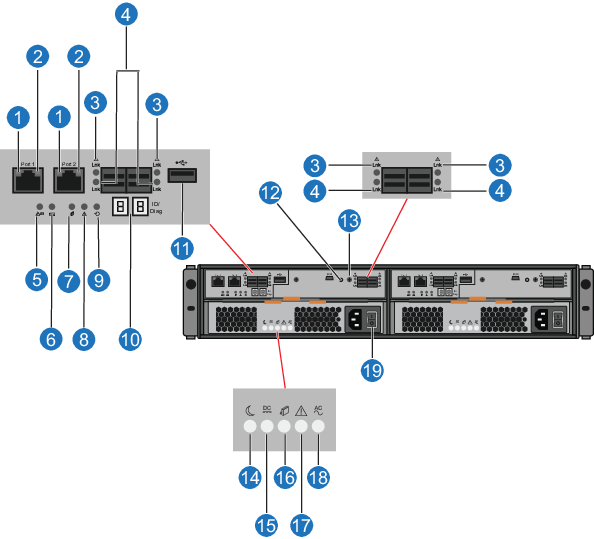
Table 1: Array Module LEDs and Buttons
| Item | Button/LEDs | Description |
|---|---|---|
| 1 | Ethernet link rate (green) | Solid - port speed 1000MB/sec. Off - port speed 10/100MB/sec. |
| 2 | Ethernet activity (green) | Solid - link established. Blinking - indicates port activity. |
| 3 | SAS host/expansion fault (amber) |
Both Off - cable unplugged. Fault Off and Activity On - all links operating. Fault On and Activity Off - at least one link active and at least one link fault. |
| 4 | SAS host/expansion activity (green) |
Both Off - cable unplugged. Fault Off and Activity On - all links operating. Fault On and Activity Off - at least one link active and at least one link fault. |
| 5 | Battery fault (amber) |
On - battery has failed. Off - battery operating as normal. |
| 6 | Battery charging (green) |
Blinking - battery is charging. On - battery is fully charged. Off - battery fault or no battery |
| 7 | Service action allowed (blue) | Solid - safe for Quantum field service. to remove controller from slot. |
| 8 | Service action required (amber) | Solid - controller has failed and requires attention. Fault light will be on during power up and will turn off after self-test sequence completes. |
| 9 | Cache active (green) |
Solid - unwritten data is stored in cache. Blinking - during AC power failure, cache offload is occurring. |
| 10 | Seven segment display (green) | Displays tray ID and error code. (Displays 99 when the Array module is operating normally.) |
| 11 | USB | Not used. |
| 12 | Mini USB | Not used. |
| 13 | Reset switch | Not used. |
| 14 | Standby power (green) | Solid - main DC power is off and 5V standby power is on. |
| 15 | DC enabled (green) | Solid - DC power rails are within specified limits. |
| 16 | Service action allowed (blue) | Solid - safe for Quantum field service. to remove power supply from slot. |
| 17 | Service action required (amber) | Solid - power supply has failed and requires attention. |
| 18 | AC enabled (green) | Solid - power is being applied to the power supply and the power switch is on. |
| 19 | Power switch | Module power switch. |
