Locate the System Serial Number
 Top-right of System
The VS4160-NVR system serial number label is located as follows:
- Top-right of the system (2).
- Refer to the following image for the serial number location (2).
-
A smaller serial number sticker is located on the back and right side of the unit.
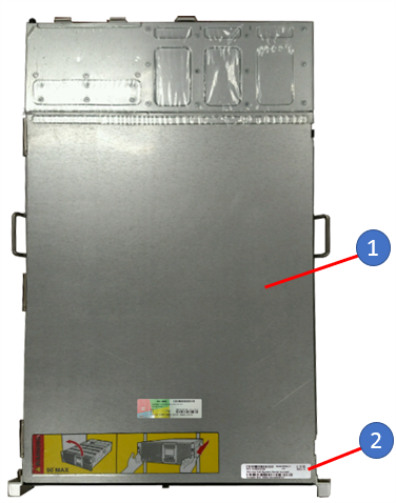
Item Description 1 VS4160-NVR System 2 Serial Number Label
Back of System
The VS4160-NVR system serial number label is also located on the back of the unit (2).
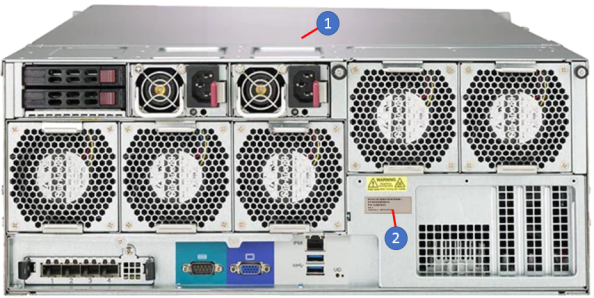
| Item | Description |
|---|---|
| 1 | VS4160-NVR system |
| 2 | Serial Number Label |
Right Side of System
The VS4160-NVR system serial number label is also located on the right-forward side of the unit (2).
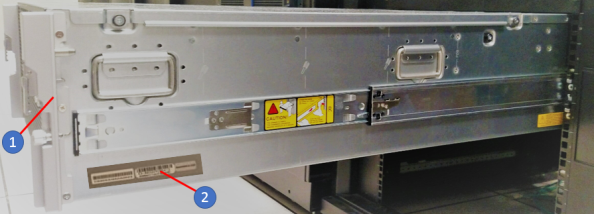
| Item | Description |
|---|---|
| 1 | VS4160-NVR system |
| 2 | Serial Number Label |
Access Serial Number in Windows
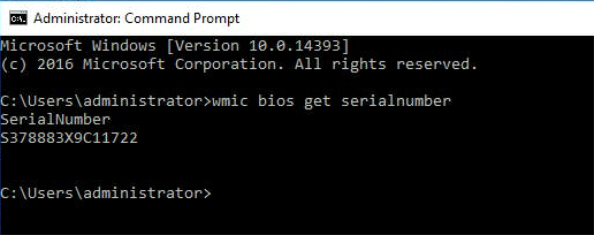
Access the system serial number in Windows as follows:
- Access the "Administrator: Command Prompt".
-
Enter the command: wmic bios get serial number.
Note: Serial number displays. See example below.